Showing posts with label Tips. Show all posts

Thursday, 26 April 2012

Turn Off Motorola Photon Camera Shutter Sound Without Root

 
 When we take picture with Motorola Photon 4G it makes a very loud shutter sound. It occurs even if the phone is in silent mode. motojl123 wrote an app called "Enforced Stream Silencer" to fix this issue and many Motorola Photon 4G users found this working. Download and install the application and share your feedback here.

Download Enforced Stream Silencer

Thursday, 12 April 2012

How To Take A Screenshot in Samsung Galaxy S2 ( I9100 )


Taking screen shot in Samsung Galaxy S2 is very easy. No application needed to capture the screen.

How To:
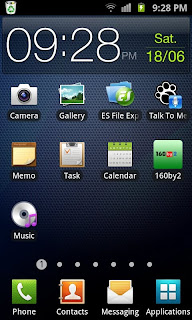
1. Press and Hold down the HOME button and then press the POWER button immediately before launching the recent apps window.
- You should hear a sound of a screenshot being taken and you should see a text that shows it has been captured and saved.

Done !! Now navigate to /sdcard/ScreenCapture or open galary to get the captured screen.

Tested This method, Works great with ofiicial Rom ( Android 2.3+ ) and not works with Resurrection Remix ics v1.3 Rom.

Friday, 11 November 2011

Take Screen Shot in Samsung Galaxy Ace Without Root


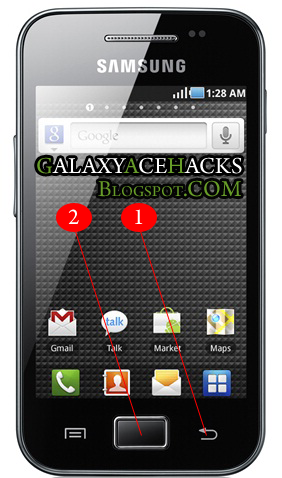
Capturing screen in Samsung Galaxy ace is so simple and achive this without using any third party application. To work this trick OS version Should be Android 2.3 GingerBread. If your OS version is 2.2 then upgrade it free.. if you have allready 2.3 then try it.

1. First press and hold the backbutton in your phone.
(marked in picure as 1)

2. Now Click your Home button and relese....
(marked in picture as 2)

If you here a capture sound and see a capture transition..Done...!!!

Now Goto your SD Card using any File browser ...will get a folder named "ScreenCapture" containing captured picture.

below is the picture captured using my Galaxy Ace GT-S5830 Android 2.3.4 GingerBread


I am tested it with Galaxy ace v 2.3.4 and worked for me.

If this helped you please do a comment....if know any other way please share by comment.

Wednesday, 2 November 2011

How to Get Apk Files From Installed Application ?

We are getting lot of free and paid applications from Android Market, But the sad part is that the application directly install to our phone. there is no backup for the application. This post giving a simple but very use full trick to backup apps as apk from the installed application.

There are many Apps that can made backup of installed apps. I prefer Astro File Manager .Coz they offering a free version of ASTRO F M with many features also you can use it in non rooted android phone. lets go through the step...

1. Download and install ASTRO File Manager Free - Download
2. After install Open ASTRO File Manager you will get 5 options. Select Application Backup


3.Now you will get a list of installed apps with a checkbox right to it. Check the app you want to backup and click Backup button on Top left of the screen.


4. Done !!! Now goto /mnt/sdcard/backups/apps using any File manager to get the apk file. now you can reuse and share it with your friends.

If this post help you please consider a comment here .. thank you