Showing posts with label android enable developer options. Show all posts

Monday, 26 November 2012

How To Enable USB Debugging in Android 4.2 Jelly Bean ?

Enable USB Debugging in Android 4.2 Jelly Bean
If you are on Android 4.2 and you can't find Developer options or USB debugging , don't worry it is not your firmware issue. In Android 4.2 Jelly bean update Google has hided Developer options menu , by default it is not visible in the Settings menu.

Yo can simply enable this Developer options by following the below method.

How To Enable USB Debugging in Android 4.2 Jelly Bean ?

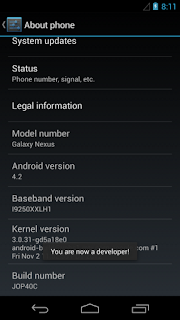
1. Go to Settings-> About phone.
2. Now tap on the Build number option repeatedly about 7 times.
Now you will get a Toast message you are now a developer.

That's it ... Now go back to Settings you will see the Developer options placed in the menu and you can enable USB debugging.