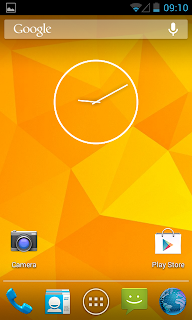
There are many custom ROM's in XDA but i like Super Nexus ROM. I started using this ROM since its 4.0.4 build and i am really satisfied with it. In my Galaxy S2 ,now i am using Super Nexus 2.0 build 3. Its really smooth. Thanks to Faryaab for making this amazing ROM.
Super Nexus 2.0 gives vanilla android experience like Google's nexus devices. The ROM is entirely built from Google's AOSP Source with lot of improvements and optimizations and removed all the third party apps(ZERO Bloatware).
Update:
I was using XWLS8 4.1.2 now again switched back to Super Nexus 2.0. Now its on Android 4.2.2 the latest one recently started giving to Nexus device only.
System Details:
- Android 4.2.2 Jelly Bean (JOP40D - Android-4.2.2_r1)
- Latest CM Kernel
- All Jelly Bean Features and Apps (Nothing excluded from AOSP)
- No Visual Changes!
- Stock Jelly Bean Look and Feel
ROM Features:
Show / Hide Content
Note:
- Phone must be rooted and Clockworkmod Recovery (CWM) installed.
- Backup your data
- battery must be 70% or above.
- download links provided on this post is only for Galaxy S2 i9100 .. if you have a different device visit forum thread to get download link.
Note from developer
Philz kernel and recovery causes some kind of issues with AOSP ROM installations, please use CF-Root, Siyah, CM or Dorimanx kernel before flashing SuperNexus.
Disclaimer : Rooting / Flashing may brick your phone we are not responsible for any damage. Do at your risk.
How to flash Super Nexus 2.0 on Galaxy S2 i9100
1. Download Super Nexus 2.0 BUILD 3 From XDA threadfrom here2. Download Gapps for Jelly Bean from here
3. Copy both downloaded files to internal SD card.
4. Switch off your phone and wait till vibrate.
5. Boot in to Clockworkmod recovery ( Volume up + Home + Power )
6. Do a Wipe data/factory reset.
7. select install zip from sdcard.
8. select choose zip from internal sdcard.
9. select SuperNexus-2.0-i9100-BUILD3.zip and install..after installation.
10. select gapps-jb-20121212-signed.zip and install...after installation.
11. select reboot system now.
That's it wait till the phone reboots...!


