
Showing posts with label root samsung galaxy s2 jelly bean. Show all posts

Saturday, 26 January 2013

How To Root Galaxy S2 Official Jelly Bean 4.1.2 XWLS8 ?

root galaxy s2 jelly bean 4.1.2 xwls8
Yesterday i was posted How To Flash Official Android Jelly Bean 4.1.2 XWLS8 on Galaxy S2 I9100 ? as a continuation of that post ,today i am writing the method to root the Galaxy S2 Official Jelly Bean 4.1.2 XWLS8 update. Like the previous root methods i was posted here .. this method also simple and secure as it is not using any root tools or insecure kernel.

The method is simple .. just install the provided zip package from stock recovery. The zip package is created by XDA senior member PhilZ.(thanks for making this).Please check the firmware details..... if your phone have the same firmware below then you can install this zip in your phone..otherwise don't try it.

Firmware Details:
Android Version: 4.1.2 – Build JZO54K
PDA: I9100XWLS8
CSC: I9100FOPLS3
MODEM: I9100XXLS8

Must Note:
- This root package is only for International Galaxy S2 I9100 Android 4.1.2 XWLS8.
- Backup Impotent Data.
- Battery Charge Must be 60% or above.

* Rooting may void warranty or it may brick your phone ..we are not responsible for anything ..do at your risk.

Root Galaxy S2 Official Jelly Bean 4.1.2 XWLS8

1. Download 4.1.2 XWLS8 Root zip package from here (v4.0 B22)
2. Copy the downloaded zip package XWLS8-ROOT-CWM6.zip to external SD card.
3. Switch off your phone and wait till vibrate.
4. Boot in to stock recovery ( Volume up + Home + Power )
5. In recovery select apply update from external storage.
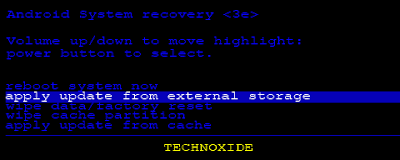
4.1.2 XWLS8 root stock recovery

6. Select copied zip file XWLS8-ROOT-CWM6.zip
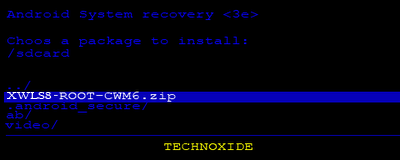
4.1.2 XWLS8 root apply update

That's it...Now you are successfully rooted Galaxy S2 I9100 Jelly Bean 4.1.2 XWLS8.

Sunday, 18 November 2012

How To Root Galaxy S2 Jelly Bean 4.1.2 XXLSJ ?

root galaxy s2 jelly bean 4.1.2 xxlsj
As a continuation of the post How To Manually Update Samsung Galaxy S2 to Stock Jelly Bean 4.1.2 I9100XXLSJ ?, in this post i am writing about the method to root Samsung Galaxy S2 Jelly Bean 4.1.2 XXLSJ. This method of rooting is more secure and simple. You don't need to install any insecure kernel and you don't need to use any third party tools, Just install the provided zip package from stock recovery.

We should thank to XDA senior member PhilZ for the zip package with a short time. The package contains root files , CWM6 and SuperSu.

Warning : Rooting will void phones Warrenty ! Rooting / Flashing may brick your phone ! We are not responsible for any damage do at your risk !

Note:
1. Backup Importent Data
2. Battery charge must be 60% or more

Root Galaxy S2 Jelly Bean 4.1.2 XXLSJ using zip package

1. Download 4.1.2 XXLSJ Root zip package from here (v3.75)
2. Copy the downloaded zip package XXLSJ-ROOT-CWM6.zip to external SD card.
3. Switch off your phone and wait till vibrate.
4. Boot in to stock recovery ( Volume up + Home + Power )
5. In recovery select apply update from external storage.

root galaxy s2 xxlsj recovery external storage

6. Select copied zip file XXLSJ-ROOT-CWM6.zip


7. After installation ....select reboot system now...

That's it...Now you are successfully rooted Galaxy S2 4.1.2 XXLSJ.